
API export
When a task in Etals finishes, Etals can send the produced content straight to your system. Etals makes an HTTPS POST with a JSON body to a URL you give us. This is the Custom API integration, often called “the webhook”.
Your side is one receiver endpoint: check the auth header, store the values, answer 200.
Who sets it up
The Custom API integration is configured by Etals. Send your Etals contact:
Only properties that are allowed to leave Etals are sent:
- Properties created in Etals start as Internal only. Switch each property you want to receive to Exportable on its property page. Properties that stay Internal only are never sent.
- Properties that an import created, for example a file import, belong to that import and are exported without the switch. Check the switch for every property you expect to receive.
Etals can also replace the payload with a custom shape for your workspace. The rest of this page describes the standard payload.
When Etals sends data
An export starts when a task that is set to publish has its results published:
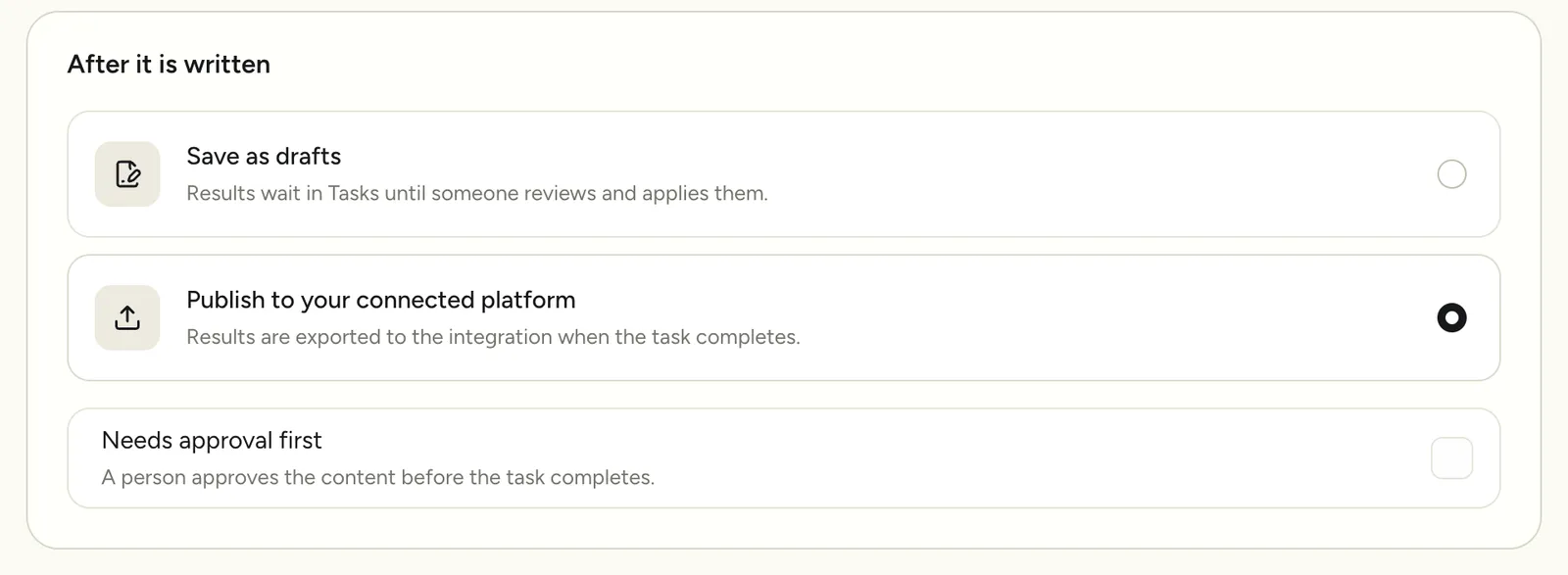
- Automations. In the automation builder, under After it is written, Publish to your connected platform sends the results when the task completes. Save as drafts keeps the results in Etals and sends nothing. The two choices only show once the content type is connected to an integration, such as your Custom API export. Without one, results are always kept as drafts. When Publish to your connected platform is selected, the summary next to the builder reads Exports to Custom API when a task completes.
- Approval. When Needs approval first is on, the task completes, and exports, after a person has approved the content.
- Tasks run in the grid. New values are committed when a run is done. The Export to Custom API switch in the Generate window, or Also export to Custom API under Finish task, decides whether they are also sent to your endpoint.
- Feedback tasks. Tasks created from the Feedback API export when they finish. See that page for the exact rules.
- Retries. See Export status and retries.
The request
- The
Authorizationheader is only sent when an API key is configured. A key starting withBearerorBasicis sent as is. Any other key is sent asBearer {key}. - No other custom headers are sent, and requests are not signed. There is no
Acceptheader. - The
User-Agentis the generic one of Etals’ HTTP client (GuzzleHttp/7today). Do not rely on it to identify Etals.
The payload
This is a real request from the Nordvik Outdoor demo workspace, trimmed to one product. An automation wrote the English and Swedish description and the meta title and meta description for the UK and Swedish websites of NV-1001.
The full request also carried the Swedish description and the Swedish meta description. A request with more products has more entries in items.
Fields
Which localization keys a value carries follows how the property is set up:
- A property written per language, like the description above, carries only
language. - A property written per website, like the meta title and meta description above, carries
brand,market,frontandlanguagetogether.
The codes are the system codes set up in your workspace, not ISO codes. In the Nordvik Outdoor workspace, for example, Norwegian is no (not nb) and the UK market is uk. Ask your Etals contact for the list, or read them with the read endpoints GET /api/v1/languages, /markets, /brands and /fronts. Do not rely on the order of keys inside a value.
Values
- Text properties send a string. Line breaks are sent as
\n, as in the description above. - HTML properties send the value exactly as Etals stores it, as a string. Etals does not add, strip or convert markup on the way out. If your prompts write HTML you receive HTML, if they write plain paragraphs you receive plain paragraphs. The description in the example is an HTML property whose content is plain text.
- Option properties send an array with the stored value of each selected option, not Etals’ option IDs. For options that came from your own data this is the value you sent. If an option was removed after the task ran, its slot in the array can be
null. - A localization the task produced no result for is left out, rather than sent as
null.
The body is standard JSON, encoded the way PHP encodes it: characters outside ASCII are escaped and / is escaped. The Swedish meta title above arrives as "Fjord Shell Jacket | H\u00e5ller dig torr | Nordvik Outdoor" and 20k/20k as 20k\/20k. Any JSON parser turns these back into the original text, so parse the body instead of matching on the raw bytes.
All localizations
When the All localizations setting is on, every exported property also carries the current stored values of its other localizations. Those extra values have no value_id, because they were not produced by this task. For example, a task that only wrote the UK meta description of NV-1001 sends the UK value with its value_id, followed by the stored Swedish, Norwegian, Danish and German meta descriptions without one.
Batches
- One task can lead to several requests.
- A request holds at most 100 items. Etals can set a lower limit with the batch size setting. With a batch size of
1, a task with two products sends two requests. - Large tasks are split into chunks (1,000 items by default) that are exported in parallel. Do not assume requests arrive in any particular order.
- Each request is independent. There is no “start” or “end” message.
Mirror URLs
When mirror URLs are set, Etals sends the same request, with the same body and headers, to each mirror first and then to the main URL. This happens for every batch. Mirror responses are logged but ignored: a mirror that answers 500 does not fail the export. Only the main URL decides the export status.
How Etals reads your response
Etals only sends to public addresses. A URL that isn’t http or https, can’t be resolved, or points to a private or internal network fails without being called, for example with API request failed with exception: The address points to a private or internal network and was not fetched: {url}. The same check applies to mirror URLs and to redirects.
The response body is only used as the error text, so return a short, readable message on errors. For example, a 500 with the body Receiver database is down, try again later is stored as API request failed with status 500 : Receiver database is down, try again later. When your endpoint cannot be reached at all, the stored error is the HTTP client’s message and includes your URL, for example API request failed with exception: cURL error 7: Failed to connect to ....
Etals does not retry a failed export on its own. Failed items stay failed until the export is sent again, see Export status and retries. Answer 2xx as soon as you have stored the request, and do the heavy work afterwards.
Items in a task that are not part of the export get the status Skipped with the message This property is not exportable. It can be made exportable in property settings.
Export status and retries
Where you see the export status depends on the kind of task.
Automation tasks open as a grid. Each committed value shows its export status above its text: Committed and exported to Custom API, Exporting to Custom API, Export waits for review or Export failed. Hovering Export failed shows the stored error, for example API Endpoint: API request failed with status 500 : Receiver database is down, try again later. When values failed, a notice at the bottom of the grid also reads, for example, Custom API: 1 value not exported, with the first error.

- A failed export does not change the task status. The task still shows Finished, so look at the values.
- The grid has no retry button. Ask your Etals contact to resend the failed items, or fix the cause and generate the values again with Export to Custom API switched on.
Feedback tasks and tasks created through the API also open as a grid once they finish. The grid doesn’t show their export status, and there are no retry buttons for single items or for failed items only. To send such a task again, click Export at the top of the grid, choose Integration and follow the steps. Etals then sends every value of the task again, with its current content.
Duplicates and ordering
Plan for receiving the same content more than once. It happens on every retry, when a feedback task regenerates a value, and when a request timed out on our side after your receiver already stored it.
- Key what you store on identifier + property
system_code+ localization (language,market,brand,front). Treat each value as an upsert of that key. value_ididentifies one produced value in one task. A retry sends the samevalue_idagain. If someone edited or regenerated that value inside the same task before it was sent again, the samevalue_idarrives with new content, so store the content you receive rather than skipping knownvalue_ids.- A later task gets new, higher
value_ids. If two requests carry values with differentvalue_ids for the same key, the one with the highervalue_idis newer. - Values sent because of All localizations have no
value_id. Treat them as the current value at the time of sending.
Securing your endpoint
Requests are not signed. Protect your endpoint like this:
- Use HTTPS only.
- Give Etals a long random secret as the API key and reject requests whose
Authorizationheader does not match. BothBearertokens andBasiccredentials work. - Compare the header in constant time, and do not log it.
- If you need an IP allowlist, ask your Etals contact which addresses exports come from before you rely on one.
- Do not redirect the export URL. Point Etals at the final URL.
Minimal receiver
Both examples check the Authorization header, walk attributables[].items[].properties[].values[], store each value keyed as described above, and answer quickly.
saveForLaterProcessing stands for your own code: write the rows to a queue or table, and update your product data from there.
Feedback on exported values
If a reviewer or a check in your system finds a problem with a value, send it back with the value_id, or with the identifier, property and localization. Etals stores the feedback and can regenerate the value. See API Feedback.